Doublelook Enterprise
Server based Sync from CRM to Cloud for Multiple Users
DoubleLook Enterprise synchronizes data for multiple users.
Instead of installing and managing synchronization software on each user's PC, simply install DoubleLook Enterprise on one PC or server that is always on. Each user you wish to sync data for is configured as a Profile through our User Management Console. DoubleLook Enterprise works 24/7 to keep data for all Profiles synchronized.
Average rating 4.83/5 (662 reviews) Money‑back guarantee Free US‑based phone support
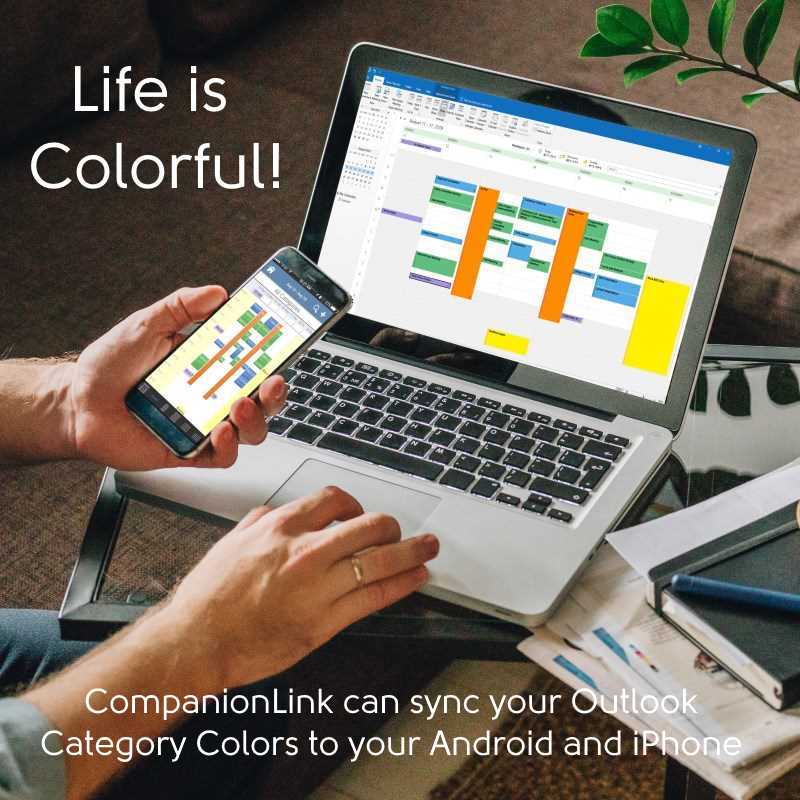
Sync contacts, calendar, tasks/to-dos, notes, histories, and other information from your Contact Manager or CRM to your phone, tablet, or Google account.
Supported Contact Managers and CRMs
- Act! Pro (Act! Desktop)
- Act! Premium Cloud
- GoldMine
- Microsoft Office 365, Exchange Activesync
- DejaOffice PC CRM via DejaCloud
Common Web Based Destinations
- Office 365 Cloud, Exchange Activesync
- Google Contacts and Calendar
- Android, iPhone, iPad via DejaCloud
Requirements
- DoubleLook Enterprise installed on one PC in your office
- A CRM Login for each user
- A Cloud Login for Google, Office 365, Exchange (EAS) or DejaCloud for each user

Click here to ask us anything!
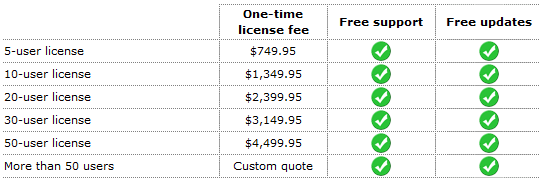
Pricing
 Doublelook Enterprise Setup Guide
Last modified: Mar 20, 2026 12:39 pm